
Roles can be customized to define what level of access the user has, ensuring security and proper governance within the platform. This feature helps teams collaborate efficiently while maintaining control over cloud asset visibility and management.
Introduction
Users must be added to the Dashboard to use the many features of the Dashboard. A user must be set-up in AWS before following this procedure.
Settings > Manage Users
Adding a User
Add users to the Dashboard, and set their role.
- Click the + Invite User button. The Invite Users screen displays.
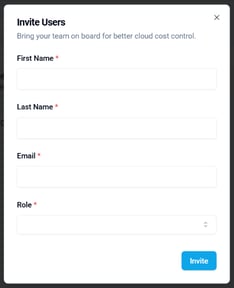
- Complete the fields of this screen and click the Invite button. (The red asterisk * indicates a required field).
Added to the List of Users
The selected user will be added to the list of users. The selected user will receive an email with an invitation to log-in to the Dashboard.